What Are Parallel Routes?
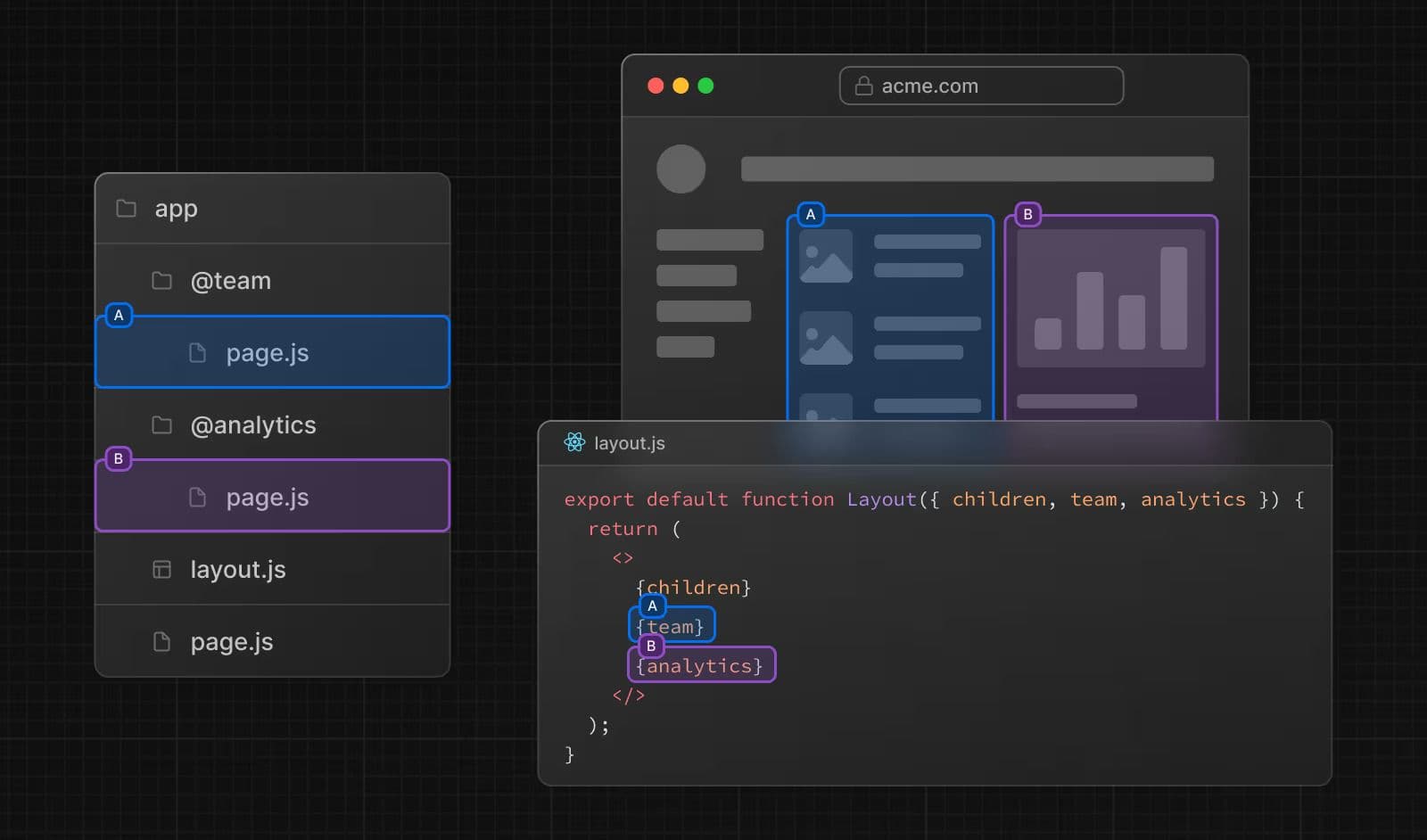
Parallel Routes allow you to render one or more pages simultaneously within the same layout.
Notice I said pages, not components. That distinction is the whole point, and we will get to why it matters shortly.
The Classic Dashboard Problem
Let us use the example straight from the Next.js docs. Imagine you have a dashboard at /dashboard with two sections: one showing team members and another showing analytics.
The natural approach most developers reach for looks like this:
// app/dashboard/page.tsx

import TeamSection from "@/components/TeamSection";
import AnalyticsSection from "@/components/AnalyticsSection";

export default function DashboardPage() {
  return (
    <div className="grid grid-cols-2 gap-4">
      <TeamSection />
      <AnalyticsSection />
    </div>
  );
}// components/AnalyticsSection.tsx
async function AnalyticsSection() {
const data = await fetchAnalytics();
return <div>{/* render analytics */}</div>;
}This works. Both components fetch their own data, Next.js streams them independently via React Suspense, and everything looks fine. But here is the catch: these are components, not pages. That means you lose access to several powerful features that are only available to actual page files in the App Router.
Why Use Parallel Routes?
The core reason is that each slot you define becomes a full-fledged page, not just a component. That unlocks everything the Next.js page model gives you.
1. loading.tsx Per Section — For Free
Normally, to get a loading state for a Server Component, you wrap it manually in a Suspense boundary:
// Without parallel routes — manual Suspense required
import { Suspense } from "react";
import AnalyticsSection from "@/components/AnalyticsSection";

export default function DashboardPage() {
  return (
    <Suspense fallback={<div>Loading analytics...</div>}>
      <AnalyticsSection />
    </Suspense>
  );
}export default function AnalyticsLoading() {
return (
<div className="animate-pulse rounded-lg bg-muted h-48 w-full" />
);
}Each section gets its own isolated loading state. If analytics takes 3 seconds and the team section loads in 200ms, team is fully interactive while analytics is still loading. No extra wiring needed.
2. error.tsx Per Section — Also For Free
Same story for error handling. Without Parallel Routes, you need to build your own error boundary logic around each Server Component. With Parallel Routes, you just add an error.tsx to the slot:
// app/dashboard/@analytics/error.tsx
"use client";

export default function AnalyticsError({
  error,
  reset,
}: {
  error: Error;
  reset: () => void;
}) {
  return (
    <div className="flex flex-col items-center gap-2 p-4 border rounded-lg">
      <p className="text-destructive font-medium">Failed to load analytics.</p>
      <button onClick={reset} className="text-sm underline">
        Try again
      </button>
    </div>
  );
}
If the analytics fetch throws, only that card shows an error. The rest of the dashboard keeps working normally.
3. Direct Access to params and searchParams
Because each slot is a real page, it receives params and searchParams as props just like any other page.tsx. No need to thread props down or drop into a Client Component just to read URL state:
// app/dashboard/@analytics/page.tsx

export default async function AnalyticsPage({
  searchParams,
}: {
  searchParams: { range?: string };
}) {
  const range = searchParams.range ?? "7d";
  const data = await fetchAnalytics({ range });

  return <AnalyticsChart data={data} />;
}
A user can filter the analytics section via ?range=30d in the URL and each slot reads it independently.
4. URL-Driven Shareable Modals
This is the most powerful use case. When you combine Parallel Routes with Intercepting Routes (a topic for the next post), you can build modals tied to the URL.
What does that mean in practice? If a user opens a photo modal at /photos/42, the URL updates to reflect that. If they copy the URL and send it to someone, that person lands directly on the same open modal. Close the modal and you navigate back to where you were — not to a blank page.
None of that is possible when you control a modal with plain useState. Here is what the layout looks like:
// app/layout.tsx

export default function RootLayout({
  children,
  modal,
}: {
  children: React.ReactNode;
  modal: React.ReactNode;
}) {
  return (
    <html lang="en">
      <body>
        {children}
        {modal}
      </body>
    </html>
  );
}
The modal slot sits alongside children in the root layout. When a route is intercepted the modal renders, when it is not the slot renders nothing. Deep linking, back navigation, and refresh all work correctly out of the box.
5. Role-Based Views Without Conditional Rendering Spaghetti
If your admin dashboard looks completely different from a regular user dashboard, Parallel Routes let you handle that cleanly at the file-system level:
// app/dashboard/layout.tsx

import { getUser } from "@/lib/auth";

export default async function DashboardLayout({
  admin,
  user,
}: {
  admin: React.ReactNode;
  user: React.ReactNode;
}) {
  const { role } = await getUser();

  return <div>{role === "admin" ? admin : user}</div>;
}
```

Each role has its own slot — a separate folder — with its own pages,
 loading states, and error handling. No giant `if/else`
blocks tangled inside a single component.

---

## The `@slot` Convention

Parallel Routes use a naming convention called **Slots**.
A slot is a folder prefixed with the `@` symbol:
```
app/
  dashboard/
    layout.tsx         <- receives slots as props
    page.tsx           <- the implicit "children" slot
    @analytics/
      page.tsx
      loading.tsx
    @team/
      page.tsx
      loading.tsx
Important: Slots do not affect the URL. The @analytics folder renders at /dashboard, not /dashboard/analytics. The @ prefix tells Next.js "this is a slot, not a route segment." A file at app/dashboard/@analytics/members/page.tsx is still accessible at /dashboard/Wiring It Together in layout.tsx
Once your slots are created, you accept them as props in the shared layout.tsx:
// app/dashboard/layout.tsx

export default function DashboardLayout({
  children,
  analytics,
  team,
}: {
  children: React.ReactNode;
  analytics: React.ReactNode;
  team: React.ReactNode;
}) {
  return (
    <div className="p-6">
      <h1 className="text-2xl font-bold mb-6">Dashboard</h1>
      <div className="grid grid-cols-1 md:grid-cols-2 gap-6">
        {analytics}
        {team}
      </div>
      <div className="mt-6">{children}</div>
    </div>
  );
}
Each slot is passed as a prop named after the folder without the @. The children prop maps to the page.tsx file sitting directly inside the dashboard folder — it is the implicit default slot that always exists.
Do Not Forget: default.tsx
When you navigate to a URL that does not match any route for a given slot, Next.js needs a fallback. That is what default.tsx is for:
// app/dashboard/@analytics/default.tsx

export default function AnalyticsDefault() {
  return null;
}
Without this file, navigating to a sub-route where a slot has no match will throw a 404. Always add a default.tsx to every slot you create.
When Should You Use This?
Parallel Routes are not something you need on every page. Reach for them when:
- You have a dashboard with multiple independent sections that need their own loading and error states
- You want modals that are shareable via URL, combined with Intercepting Routes
- You are implementing role-based views and want clean file-system separation instead of messy conditional rendering logic
- You need
paramsorsearchParamsinside what would otherwise be a deeply nested component
The mental model is simple: instead of rendering components inside a page, you render pages inside a layout. That shift gives each section the full power of the Next.js page model — loading states, error boundaries, URL access — all without creating new URL segments or adding boilerplate.
I also recommend reading the Parallel Routes section in the official Next.js docs. There are more edge cases worth knowing, especially around sub-navigation within slots.
If this post was useful, a like or a share genuinely helps me keep writing content like this.
In the next post I will cover Intercepting Routes and show how the two features work together to build URL-driven modals the right way.
Yousef Saeed
Full-Stack Developer · Cairo, Egypt